
Rails
Contents
- Requirements
- Installation
- Out of the box
- Configuring where logs go: the appenders block
- Appender options and destinations
- Common recipes
- Tuning what Rails logs
- Metrics (prototype)
- Operational notes
- Upgrading to v5.1
- Migrating from v4 to v5
- Migrating from earlier versions
- Deprecated configuration options
rails_semantic_logger is a companion gem that wires Semantic Logger into Rails for you. Once installed it:
- Replaces the default Rails logger with Semantic Logger, so Rails, your application code, and many common gems all log through it.
- Collapses the several lines Rails normally logs per request into a single, structured “Completed” line, while keeping the individual fields (controller, action, status, durations, and so on) searchable.
- Lets you send logs anywhere Semantic Logger supports: the standard Rails log file, standard out as JSON for a container platform, a centralized log service, or several of these at once.
This page is a step-by-step guide that assumes no prior knowledge of either gem. Work through it top to bottom: each section builds on the previous one. For the underlying logging API (logging methods, tags, metrics, and so on) see the Programmer’s Guide, and for the full catalog of log destinations see Appenders.
Upgrading from v4? The way appenders (log destinations) are configured changed in v5. Jump to Migrating from v4 to v5, then come back here.
Requirements
Rails Semantic Logger v5 requires Ruby 3.2 or later and Rails 7.2 or later. For the exact list of tested Ruby and Rails versions, see the CI workflow.
Installation
Add the following lines to your Gemfile:
gem "rails_semantic_logger"
gem "amazing_print" # optional
amazing_print is optional but recommended: it produces colorized, readable output of the
structured data (the Hash payload) in development.
Install with bundler:
bundle install
That is all that is required. Rails Semantic Logger automatically replaces the standard Rails logger with Semantic Logger and writes to the usual Rails log file.
Remove conflicting gems
Remove the following gems if present. They conflict with or duplicate what Rails Semantic Logger already does:
logragerails_stdout_loggingrails_12factor
Out of the box
With no configuration at all, Rails Semantic Logger:
- Writes to
log/<environment>.log(for examplelog/development.log), the same file Rails uses. - Colorizes that output when Rails colorized logging is enabled (the default in development).
- Logs to standard out when you run
rails server, so you see requests in your terminal. - Logs to standard error when you run
rails console, so log lines do not get mixed up with the return values of the commands you type. - Replaces the multi-line Rails request log with a single structured “Completed” line.
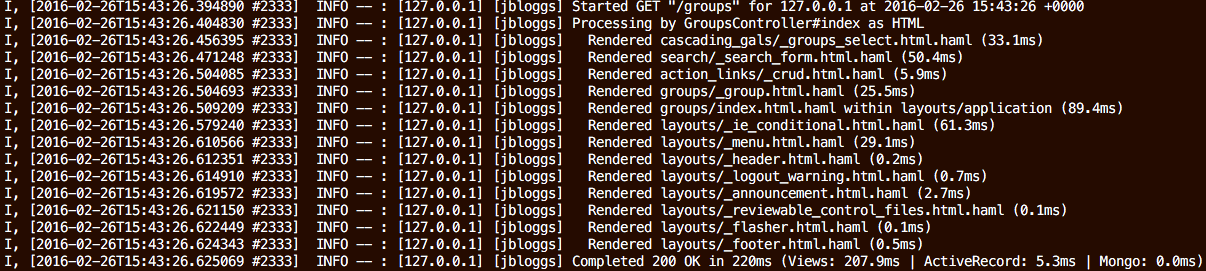
Standard Rails log output for a single page request:
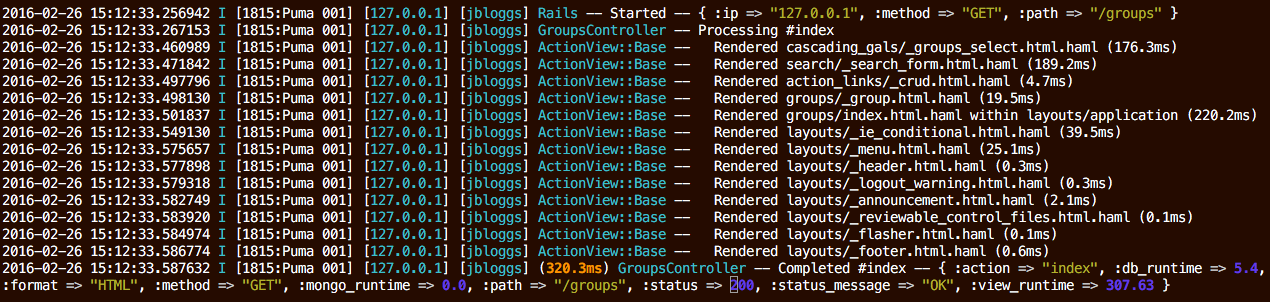
The same request after adding the rails_semantic_logger gem:

The rest of this page shows how to change where logs go and how they are formatted (the appenders block), and then how to fine-tune what Rails logs.
Configuration goes in config/application.rb (for all environments) or in an environment file under
config/environments/ (for one environment).
Use those two places, not config/initializers/*. Rails builds the logger before it loads
initializers, so the appenders block and the semantic, replace_sidekiq_logger, and
replace_solid_queue_logger options have no effect from an initializer; Rails Semantic Logger
prints a warning when it detects this. The output-tuning options consumed later in boot (started,
processing, rendered, quiet_assets, action_message_format) do still work from an
initializer, but not once the application has finished booting.
Configuring where logs go: the appenders block
An appender is a destination for log output: a file, standard out, a centralized log service, and so on. You declare the appenders you want inside a single block:
config.rails_semantic_logger.appenders do |appenders|
  appenders.add(file_name: "log/#{Rails.env}.log", formatter: :color)
end
There are three ways to declare an appender. The method name says when the appender is created; the arguments say where it writes and how it is formatted.
| Method | Created when… | Default destination |
|---|---|---|
add |
Always, during Rails initialization | (you must specify one) |
add_server |
Only when serving requests: rails server (see the note under Step 3) and Sidekiq in server mode |
$stdout |
add_console |
Only inside a rails console session |
$stderr |
The arguments to all three are exactly the arguments to SemanticLogger.add_appender (covered in
detail in the next section), so anything Semantic Logger can
log to, any of these can declare. One default of note: since add_server and add_console are
screen appenders, their formatter: defaults to :color when not specified; add uses the
Semantic Logger default of plain text.
Important: As soon as you declare any appender in this block, Rails Semantic Logger stops adding all of its automatic appenders: the default
log/<env>.logfile, the standard-out logger it normally adds underrails server, and the standard-error logger it normally adds inrails console. The block becomes the single source of truth for every destination. So declare what you want:addfor an always-on destination (such as the file log),add_serverfor screen output while serving, andadd_consolefor the Rails console.
Step 1: a single log file
config.rails_semantic_logger.appenders do |appenders|
  appenders.add(file_name: "log/#{Rails.env}.log", formatter: :color)
end
Step 2: add a JSON file for a log aggregator
Keep the human-readable color log and also write a JSON file for ingestion by Elasticsearch, Splunk, Datadog, and the like:
config.rails_semantic_logger.appenders do |appenders|
  appenders.add(file_name: "log/#{Rails.env}.log", formatter: :color)
  appenders.add(file_name: "log/#{Rails.env}.json", formatter: :json)
end
You can declare as many appenders as you like; every log entry is sent to all of them.
Step 3: log to the screen only while serving
add_server declares an appender that is created only when the application is actually serving
requests (under rails server or Sidekiq in server mode), and never during rake tasks, runners, or
generators. It defaults to $stdout:
config.rails_semantic_logger.appenders do |appenders|
  appenders.add(file_name: "log/#{Rails.env}.log", formatter: :json)
  appenders.add_server(formatter: :color) # → $stdout, only when serving
end
Note: Under
rails server, the appender is created when Rails itself would log to standard out: in development, when not daemonized. To get it in another environment, pass--log-to-stdouttorails server. App servers started directly (barepuma,rackup, and so on) need a one-line boot hook; see Other app servers.
Step 4: a dedicated console logger
add_console declares an appender created only inside a rails console session. It defaults to
$stderr so log output does not interleave with the results of the expressions you type:
config.rails_semantic_logger.appenders do |appenders|
  appenders.add(file_name: "log/#{Rails.env}.log", formatter: :json)
  appenders.add_server(formatter: :color)  # $stdout while serving
  appenders.add_console(formatter: :color) # $stderr inside `rails console`
end
Several appenders in one context
Because each call simply appends to its context, a context can have more than one appender. For example, write a color stream and a JSON file, but only while serving:
config.rails_semantic_logger.appenders do |appenders|
  appenders.add_server(io: $stdout, formatter: :color)
  appenders.add_server(file_name: "log/#{Rails.env}.log", formatter: :json)
end
Appender options and destinations
Every add, add_server, and add_console call accepts the same arguments as
SemanticLogger.add_appender. This section is the one-stop reference for those arguments, written as
Rails examples. For the complete list of destinations and their service-specific options, see
Appenders.
Common options
In addition to a destination, most appenders accept these options:
| Option | Description |
|---|---|
level |
Only write entries at this level or higher to this appender. Defaults to SemanticLogger.default_level (which Rails Semantic Logger sets from config.log_level). |
formatter |
How to format the output: :default, :color, :json, :logfmt, :one_line, or a custom formatter (see Output formats). |
filter |
A Regexp or Proc selecting which entries this appender accepts. See Filtering. |
application, environment, host |
Override the global values for this appender only. |
For example, send only warnings and above to a separate JSON file:
config.rails_semantic_logger.appenders do |appenders|
  appenders.add(file_name: "log/#{Rails.env}.log", formatter: :color)
  appenders.add(file_name: "log/#{Rails.env}_errors.json", formatter: :json, level: :warn)
end
Destinations
The destination is chosen by the argument you pass:
| Destination | Argument | Notes |
|---|---|---|
| Text or JSON file | file_name: |
A path under log/. |
| IO stream | io: |
$stdout, $stderr, or any IO. |
| Built-in appender | appender: :name |
Selects a packaged appender by name (syslog, elasticsearch, http, bugsnag, and many more). |
| Existing Ruby/Rails logger | logger: |
Wrap another logger instance. |
| Metrics destination | metric: |
See Metrics. |
A few common examples, all inside the appenders block:
config.rails_semantic_logger.appenders do |appenders|
  # Local file
  appenders.add(file_name: "log/#{Rails.env}.log", formatter: :color)

  # Local Syslog
  appenders.add(appender: :syslog)

  # Remote syslog such as syslog-ng over TCP
  appenders.add(appender: :syslog, url: "tcp://myloghost:514")

  # Elasticsearch
  appenders.add(appender: :elasticsearch, url: "http://localhost:9200")

  # A generic HTTP(S) endpoint
  appenders.add(appender: :http, url: "https://logs.example.com/ingest")

  # Bugsnag (errors and above)
  appenders.add(appender: :bugsnag, level: :error)
end
Appenders for third-party services require their backing gem to be installed. See Appenders for the full list of destinations, their gems, and their options.
Output formats
The formatter: option controls how each appender renders a log entry. Because it is per appender,
you can write color to the screen and JSON to a file at the same time.
| Formatter | Output |
|---|---|
:default |
Plain text, no color. |
:color |
Plain text with color (uses Amazing Print for the payload when installed). |
:json |
One JSON object per entry. |
:logfmt |
key=value logfmt output. |
:one_line |
Each entry reduced to a single line. |
| A class instance | Any instance of a class derived from SemanticLogger::Formatters::Base. |
A Proc |
Called with the log entry; returns the formatted output. |
JSON example:
config.rails_semantic_logger.appenders do |appenders|
  appenders.add(file_name: "log/#{Rails.env}.json", formatter: :json)
end
Custom formatter. Create app/lib/my_formatter.rb:
# A custom colorized formatter
class MyFormatter < SemanticLogger::Formatters::Color
  # Return the complete log level name in uppercase
  def level
    "#{color}#{log.level.upcase}#{color_map.clear}"
  end
end
Then use it:
config.rails_semantic_logger.appenders do |appenders|
  appenders.add(file_name: "log/#{Rails.env}.log", formatter: MyFormatter.new)
end
See SemanticLogger::Formatters::Color for the methods you can override, and Custom formatters for more on formatters.
Amazing Print options for the color formatter
The color formatter renders the payload Hash with Amazing Print. To pass options to it, give the
:color formatter a Hash:
config.rails_semantic_logger.appenders do |appenders|
  appenders.add(
    file_name: "log/#{Rails.env}.log",
    formatter: {color: {ap: {multiline: false}}}
  )
end
See the Amazing Print documentation for the
available options (or set defaults in a ~/.aprc file). This has no effect if Amazing Print is not
installed.
Common recipes
Development
Color to both the log file and the screen:
# config/environments/development.rb
config.rails_semantic_logger.appenders do |appenders|
  appenders.add(file_name: "log/development.log", formatter: :color)
end
(The default already does this, so in development you often need no configuration at all.)
Production on a container platform (Docker, Kubernetes, Heroku)
On a container platform the convention is to log JSON to standard out and let the platform collect
it. Use add (not add_server) so that rake tasks and one-off processes also log to stdout:
# config/environments/production.rb
config.rails_semantic_logger.appenders do |appenders|
  appenders.add(io: $stdout, formatter: :json)
end
Because the block disables the automatic appenders, this JSON-to-stdout appender is the only
destination: there is no default file log and no separate color logger under rails server, which
is exactly what a container platform wants.
To keep one configuration that works both locally and in-cluster, gate the JSON appender on an
environment variable that is only set in the container platform. For example, in
config/application.rb (so it applies to every environment), switch to JSON on standard out only
when running inside Kubernetes:
# config/application.rb
config.semantic_logger.application = "my_application"
config.semantic_logger.environment = ENV["STACK_NAME"] || Rails.env
config.log_level = ENV["LOG_LEVEL"] || :info

if ENV["LOG_TO_CONSOLE"] || ENV["KUBERNETES_SERVICE_HOST"]
  config.rails_semantic_logger.appenders do |appenders|
    appenders.add(io: $stdout, formatter: :json)
  end
end
Outside the cluster the block is skipped, so the default log/<env>.log file and the usual screen
loggers apply; inside the cluster JSON to stdout becomes the only destination.
On Heroku, also allow the log level to be set from the environment:
config.log_level = ENV["LOG_LEVEL"].presence&.downcase&.to_sym || :info
heroku config:set LOG_LEVEL=debug
Production writing to files plus an error service
# config/environments/production.rb
config.rails_semantic_logger.appenders do |appenders|
  appenders.add(file_name: "log/production.json", formatter: :json)
  appenders.add(appender: :bugsnag, level: :error)
end
Other app servers: puma, rackup, Passenger, Unicorn
add_server appenders are created automatically under rails server (following Rails’ own
log-to-stdout rule: development and not daemonized, or the --log-to-stdout flag) and under Sidekiq
in server mode, because those have a definitive startup hook. App servers started directly (bare puma,
rackup, Passenger, Unicorn) have no such first-party hook, and Rails Semantic Logger deliberately
does not guess (a detection that only sometimes works is worse than none).
If you start your app with one of those servers and want your add_server appenders created, call
the helper from that server’s own boot hook. For example, in config/puma.rb:
on_booted { RailsSemanticLogger.add_server_appenders }
Alternatively, if you simply want a destination created in every context, declare it with add
instead of add_server.
Sidekiq
Sidekiq in server mode is treated as a serving context, so add_server appenders are created
automatically. No extra configuration is required.
This wiring is part of the Sidekiq logger integration, so setting
config.rails_semantic_logger.replace_sidekiq_logger = false also turns off the automatic creation.
In that case, call RailsSemanticLogger.add_server_appenders yourself from a Sidekiq startup hook:
# config/initializers/sidekiq.rb
Sidekiq.configure_server do |config|
  config.on(:startup) { RailsSemanticLogger.add_server_appenders }
end
Tuning what Rails logs
The options below adjust Rails’ own log output. They are independent of the appenders block and can be combined with it.
Log level
# One of :trace, :debug, :info, :warn, :error, :fatal
config.log_level = :debug
To change the level inside a running rails console:
SemanticLogger.default_level = :debug
Re-enable Started, Processing, and Rendered messages
By default these messages are logged at :debug so they do not appear in production. To show them:
config.rails_semantic_logger.started    = true # Rack "Started" line
config.rails_semantic_logger.processing = true # Controller "Processing" line
config.rails_semantic_logger.rendered   = true # Action View render lines
Keep Rails’ original wording
By default Action Controller and Active Record messages are converted to structured data:
Rack -- Started -- { :ip => "127.0.0.1", :method => "GET", :path => "/users" }
UserController -- Completed #index -- { :action => "index", :db_runtime => 54.64, :format => "HTML", :method => "GET", :path => "/users", :status => 200, :status_message => "OK", :view_runtime => 709.88 }
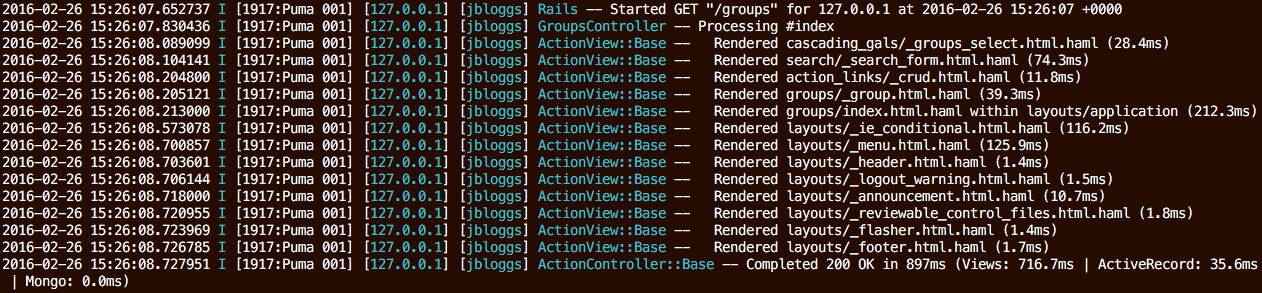
To keep Rails’ original text messages (with Semantic Logger formatting) instead:
config.rails_semantic_logger.semantic   = false
config.rails_semantic_logger.started    = true
config.rails_semantic_logger.processing = true
config.rails_semantic_logger.rendered   = true
Quiet asset logging
Rails logs asset requests at the debug level, which can clutter development logs:
Rack -- Started -- {:ip => "127.0.0.1", :method => "GET", :path => "/assets/application.css"}
To silence them:
config.rails_semantic_logger.quiet_assets = true
Color output
Color is chosen per appender with the formatter: option: use :color for colorized output and
:default for plain text (see Output formats). For example, color on screen and
plain text in a file:
config.rails_semantic_logger.appenders do |appenders|
  appenders.add(file_name: "log/#{Rails.env}.log", formatter: :default)
  appenders.add_server(formatter: :color)
end
The Rails config.colorize_logging setting does not affect appenders declared in the block; it
only influences the deprecated default file appender (see
Deprecated configuration options).
Named tags
Add tags to every log entry on a per-request basis by setting config.log_tags to a Hash:
config.log_tags = {
  request_id: :request_id,
  ip:         :remote_ip,
  user:       ->(request) { request.cookie_jar["login"] }
}
Notes:
- If a value returns
nil, that key is omitted for that request. - To turn named tags off in development, set
config.log_tags = nilinconfig/environments/development.rb.
Source file name and line number
To include the file and line number where each message originated:
config.semantic_logger.backtrace_level = :info

Warning: capturing a backtrace for every log entry allocates many objects. In production set this
to nil (disabled) or to a high level such as :error. By default backtraces are only captured for
:error and :fatal. This feature is best used in development.
Add custom data to the Completed message
Add an append_info_to_payload method to a controller to include extra fields in its Completed
message:
class ThingController < ApplicationController
  private

  def append_info_to_payload(payload)
    super
    payload[:user_id] = current_user&.id
  end
end
Customize the Completed message text
Provide a Proc to build the Action Controller message from the message and payload:
config.rails_semantic_logger.action_message_format = ->(message, payload) do
  "#{message} - #{payload[:controller]}##{payload[:action]}"
end
Background job loggers
By default Rails Semantic Logger replaces the Sidekiq and SolidQueue loggers. To leave them alone:
config.rails_semantic_logger.replace_sidekiq_logger     = false
config.rails_semantic_logger.replace_solid_queue_logger = false
Sidekiq v7 and v8 are supported. Earlier Sidekiq versions were supported up to Rails Semantic Logger v5.0.
Sidekiq job lifecycle messages
For every Sidekiq job, Rails Semantic Logger emits a Start #perform and a Completed #perform
entry (with the sidekiq.queue.latency and sidekiq.job.perform metrics). On very high job volumes
these can add noise and cost in log aggregation tools. To turn them off (the job still runs and any
exceptions are still logged):
# config/initializers/sidekiq.rb
RailsSemanticLogger::Sidekiq::JobLogger.perform_messages = false
This defaults to true, so the messages are emitted unless you opt out.
On Sidekiq 8, the standard Sidekiq setting has the same effect and is also honored:
Sidekiq.configure_server do |config|
  config[:skip_default_job_logging] = true
end
Sidekiq job logging context
Every log entry emitted while a job runs is tagged with the job’s jid, class, and queue, plus its
bid (batch id) and tags when present. On Sidekiq 8, the standard logged_job_attributes setting
is honored, so additional job attributes can be added to the logging context:
Sidekiq.configure_server do |config|
  config[:logged_job_attributes] = %w[bid tags priority]
end
Custom controller base class
If your application uses a controller base class other than ActionController::Base or
ActionController::API, Rails Semantic Logger falls back to the ActionController::Base logger, so
those entries are named ActionController::Base. To give them the correct class name, include the
mixin in your base class:
include SemanticLogger::Loggable
If the base class lives in a third-party gem, do it from an initializer:
CustomControllerBase.include(SemanticLogger::Loggable)
Metrics (prototype)
Prototype: metrics support and the metric names below are an early prototype and subject to change in a future release. Do not hard-code these names into long-lived dashboards or alerts yet.
In addition to the structured log entry, Rails Semantic Logger attaches a Semantic Logger
metric to each entry that is logged at :info, :warn, or :error. When the entry
carries a duration (a request, query, render, job run, …) the metric records that timing; otherwise
it acts as an event counter. Wire up a metrics appender (StatsD, Prometheus, …) and these flow
through automatically alongside the logs.
Metric names follow rails.<component>.<event>, where <component> is the Rails component with its
action_/active_ prefix dropped:
| Component | Metrics |
|---|---|
| Action Controller | rails.controller.process_action, rails.controller.send_file, rails.controller.send_data, rails.controller.redirect_to, rails.controller.halted_callback, rails.controller.rescue_from_callback, and the fragment-cache events (rails.controller.write_fragment, read_fragment, exist_fragment, expire_fragment, expire_page, write_page) |
| Action View | rails.view.render.template, rails.view.render.partial, rails.view.render.layout, rails.view.render.collection |
| Active Job | rails.job.<event> for every job event (enqueue, enqueue_at, enqueue_all, perform_start, perform, enqueue_retry, retry_stopped, discard, and the Rails 8.1 Continuation events interrupt, resume, step_skipped, step_started, step) |
| Action Mailer | rails.mailer.deliver |
| Solid Queue | rails.solid_queue.<event> for every Solid Queue event logged at info/warn/error (e.g. rails.solid_queue.start_process, rails.solid_queue.thread_error) |
Entries logged at :debug carry no metric. Because ActiveRecord logs SQL at :debug, there is
currently no rails.db/rails.record SQL metric, and Action View render metrics are only emitted
when rendered events are raised to :info (see
Re-enable Started, Processing, and Rendered messages).
Operational notes
Process forking
If you use a forking server (Puma, Unicorn) or fork worker processes, see
Process Forking. With Semantic Logger v5 appenders are reopened automatically after
a fork, so the manual after_fork { SemanticLogger.reopen } hook is usually no longer needed.
Log rotation
Because the log file is held open between writes, rotate it with a copy-truncate strategy rather
than deleting and recreating the file. Example logrotate configuration for Linux:
/var/www/my_app/shared/log/*.log {
  daily
  missingok
  copytruncate
  rotate 14
  compress
  delaycompress
  notifempty
}
Loggers that are replaced automatically
After they initialize, Rails Semantic Logger replaces the loggers of these libraries when present:
- Action Cable
- Bugsnag
- Delayed Job
- IOStreams
- Mongo
- Mongoid
- Moped
- Resque
- Sidekiq (unless
replace_sidekiq_logger = false) - Sidetiq
- Solid Queue (unless
replace_solid_queue_logger = false)
Upgrading to v5.1
v5.1 requires Semantic Logger v5.1 and needs no configuration changes. Two behaviors differ.
A log file that cannot be opened now fails at boot
Semantic Logger v5.1 opens the file appender’s log file when the appender is created, rather than on
the first write. A missing directory, a bad path, or insufficient permissions therefore raises
during boot, where Rails Semantic Logger catches it and falls back to logging to standard error at
the :warn level, with a message explaining the problem.
Previously that failure surfaced asynchronously on the appender thread after the application had already booted, so the fallback never ran and the app kept running against an appender that silently dropped every message. If you have been running with an unwritable log path without noticing, this release is when you will find out.
As a side effect, the log file is created as soon as the appender is added, even if nothing has been logged yet. This matches the standard Ruby and Rails loggers.
Sidekiq v4, v5, and v6 are no longer supported
Sidekiq v7 and v8 are supported and tested. The patches for older versions have been removed, along with the pre-7.1.6 error handler branches. Sidekiq v7 and v8 both predate this gem’s Rails 7.2 and Ruby 3.2 minimums, so upgrading Sidekiq is the path forward.
On Sidekiq 8 two of its own settings are now honored: logged_job_attributes adds job attributes to
the logging context, and skip_default_job_logging suppresses the Start #perform /
Completed #perform messages (an alternative to
RailsSemanticLogger::Sidekiq::JobLogger.perform_messages = false). See
Sidekiq for the logging configuration.
Migrating from v4 to v5
Ruby and Rails minimums
v5 requires Ruby 3.2+ and Rails 7.2+. It also depends on Semantic Logger v5; review the Semantic Logger upgrade notes for changes there (the most relevant for Rails apps is that appenders are now reopened automatically after fork, so you can remove manual reopen hooks).
Appender configuration is the main change
In v4 the log file, its format, and any extra destinations were configured through several separate
options (format, add_file_appender, ap_options, filter, console_logger) plus direct
config.semantic_logger.add_appender(...) calls. In v5 all of that lives in one place, the
appenders block.
These v4 options still work in v5 but emit a deprecation warning and will be removed in v6. Migrate them as follows:
| v4 | v5 |
|---|---|
config.rails_semantic_logger.format = :json |
appenders.add(file_name: "log/#{Rails.env}.log", formatter: :json) |
config.rails_semantic_logger.add_file_appender = false then config.semantic_logger.add_appender(...) |
Declare your destinations with appenders.add(...) (declaring any appender already replaces the default file appender) |
config.rails_semantic_logger.ap_options = {multiline: false} |
appenders.add(..., formatter: {color: {ap: {multiline: false}}}) |
config.rails_semantic_logger.filter = /MyClass/ |
appenders.add(..., filter: /MyClass/) |
config.rails_semantic_logger.console_logger = false |
Omit add_console (declare a console appender only if you want one) |
A v4 Heroku / standard-out configuration like:
# v4
if ENV["RAILS_LOG_TO_STDOUT"].present?
  $stdout.sync = true
  config.rails_semantic_logger.add_file_appender = false
  config.semantic_logger.add_appender(io: $stdout, formatter: config.rails_semantic_logger.format)
end
becomes, in v5:
# v5
config.rails_semantic_logger.appenders do |appenders|
  appenders.add(io: $stdout, formatter: :json)
end
Server standard-out behavior
In v4, running rails server always added a standard-out logger, which you suppressed with
bin/rails s --daemon or Puma’s --quiet. In v5 this is the job of add_server: when you use the
appenders block, declare an add_server appender to log to the screen while serving, or omit it to
stay silent. If you do not use the appenders block at all, the v4 behavior is preserved.
Migrating from earlier versions
These notes apply to upgrades between older releases and are retained for reference.
v4.16: Sidekiq metrics support
Rails Semantic Logger added support for Sidekiq metrics, available when the JSON logging format is used:
sidekiq.job.perform— the duration of each Sidekiq job;durationcontains the time in milliseconds that the job took to run.sidekiq.queue.latency— the time between when a Sidekiq job was enqueued and when it was started;metric_amountcontains the time in milliseconds that the job was waiting in the queue.
v4.15 and v4.16: Sidekiq support
Rails Semantic Logger introduced direct support for Sidekiq v4, v5, v6, and v7. Remove any previous custom patches or configurations used to make Sidekiq work with Semantic Logger. To see the complete list of patches and to contribute your own, see Sidekiq Patches. Support for Sidekiq v4, v5, and v6 ended after Rails Semantic Logger v5.0; Sidekiq v7 and v8 are supported and tested.
v4.4
With some forking frameworks it was necessary to call reopen after the fork. As of v4.4 the
workaround for Ruby 2.5 crashes is no longer needed. Remove the following line if it is called
anywhere:
SemanticLogger::Processor.instance.instance_variable_set(:@queue, Queue.new)
Deprecated configuration options
The following options still function in v5 for backward compatibility but emit deprecation warnings and will be removed in v6. Each is replaced by the appenders block.
| Deprecated option | Replacement |
|---|---|
config.rails_semantic_logger.format |
formatter: on each appender, e.g. appenders.add(file_name: ..., formatter: :json) |
config.rails_semantic_logger.ap_options |
formatter: {color: {ap: {...}}} on the appender |
config.rails_semantic_logger.filter |
filter: on the appender |
config.rails_semantic_logger.console_logger |
Declare (or omit) an add_console appender |
config.rails_semantic_logger.add_file_appender |
Declare appenders in the block (doing so already replaces the default file appender) |