
What is Semantic Logger?
Contents
Semantic Logger is a high-performance, asynchronous structured logging framework for Ruby and Rails.
It does two things that ordinary loggers do not:
- It logs structured data, not just strings. Along with the usual text message you can attach a payload (any Hash), an exception, a duration, metrics, and tags. That data is preserved all the way to the destination, so it stays searchable instead of being flattened into a line of text.
- It logs asynchronously. Log events are placed on an in-memory queue and written to their destinations by a separate background thread. Your application is not blocked while logs are written to disk, a database, or a remote service.
If you are using Rails, use the companion gem rails_semantic_logger, which replaces the Rails logger automatically. See the Rails guide.
Why use it?
The problem with traditional logging
With the standard Ruby logger you eventually end up building messages by hand:
logger.info("Queried users table in #{duration} ms, with a result code of #{result}")
That reads fine for a human, but to a machine it is just a string. To answer a question like “show me every query that took longer than 100 ms” you have to write fragile regular expressions against your log files, and every developer formats their messages slightly differently.
The Semantic Logger way
Log the message and the data separately:
logger.info("Queried users table",
  duration: duration,
  result:   result,
  table:    "users",
  action:   "query")
Now the same event is still readable by a human, but a machine can index duration, result,
table, and action as real fields. Send it to a JSON file, Elasticsearch, or Splunk and you can
search, filter, and build dashboards on those fields directly, no log parsing required.
Reasons developers choose Semantic Logger
- Fast. Logging happens on a background thread, so even logging thousands of lines per second does not slow your application down. See how it works below.
- Structured. Every log entry can carry a payload, exception, duration, metrics, and tags without losing that structure.
- Human and machine readable at the same time. Colorized text for developers, JSON for your log aggregator, written from the same log call.
- Many destinations at once. Write to a file, the screen, and a remote service simultaneously, each with its own log level and format. See Appenders.
- A familiar API. It supports the standard
debug/info/warn/error/fatalAPI, so existing code and other gems keep working. You mostly just change how the logger is created. - Built for production. Per-class log levels, change the log level of a running process with a signal, tagged logging for tracing requests across threads, automatic exception capture, and metrics for dashboards.
Quick start
Install the gem:
gem install semantic_logger
Or add it to your Gemfile:
gem "semantic_logger"
Configure it once when your application starts, then log:
require "semantic_logger"

# Log :info and above. Use :trace, :debug, :info, :warn, :error, or :fatal.
SemanticLogger.default_level = :info

# Send log output to the screen using the colorized formatter.
SemanticLogger.add_appender(io: $stdout, formatter: :color)

# Create a logger for the current class. The class name is added to every message.
logger = SemanticLogger["MyApp"]

logger.info("Application started")
That is the whole setup. The Programmer’s Guide covers the full logging API.
A tour of the features
The examples below assume you already have a logger from SemanticLogger["MyApp"].
Log a message with structured data
logger.error("Outbound call failed", result: :failed, reason_code: -10)
Log an exception
Pass the exception directly. The class, message, and backtrace are all captured, including any nested “caused by” exceptions.
begin
  # ... code that may raise
rescue => exception
  logger.error("Import failed", exception)
end
Only evaluate expensive messages when needed
Pass a block. It runs only when the log level is active, so it is skipped entirely in production when the level is higher.
logger.debug { "Processed a total of #{records.sum(&:size)} bytes" }
Measure how long something takes
The message is written when the block completes, together with its duration. If the block raises, the exception is logged with the duration and then re-raised.
logger.measure_info("Called external interface") do
  # Code to call the external service ...
end
Tag a block of related log entries
Every log entry inside the block carries the tags, which is invaluable for tracing one request across many classes and threads.
SemanticLogger.tagged(user: "jbloggs", request_id: "abc123") do
  logger.info("Hello World")
  logger.debug("More detail")
end
Name your threads
So concurrent log entries are easy to tell apart.
Thread.current.name = "worker-1"
How it works
Every logger forwards its log events to a single, shared background thread through an in-memory
queue. That thread writes each event to every registered appender (destination) in turn. Because
the writing happens off to the side, the thread that called logger.info returns immediately.
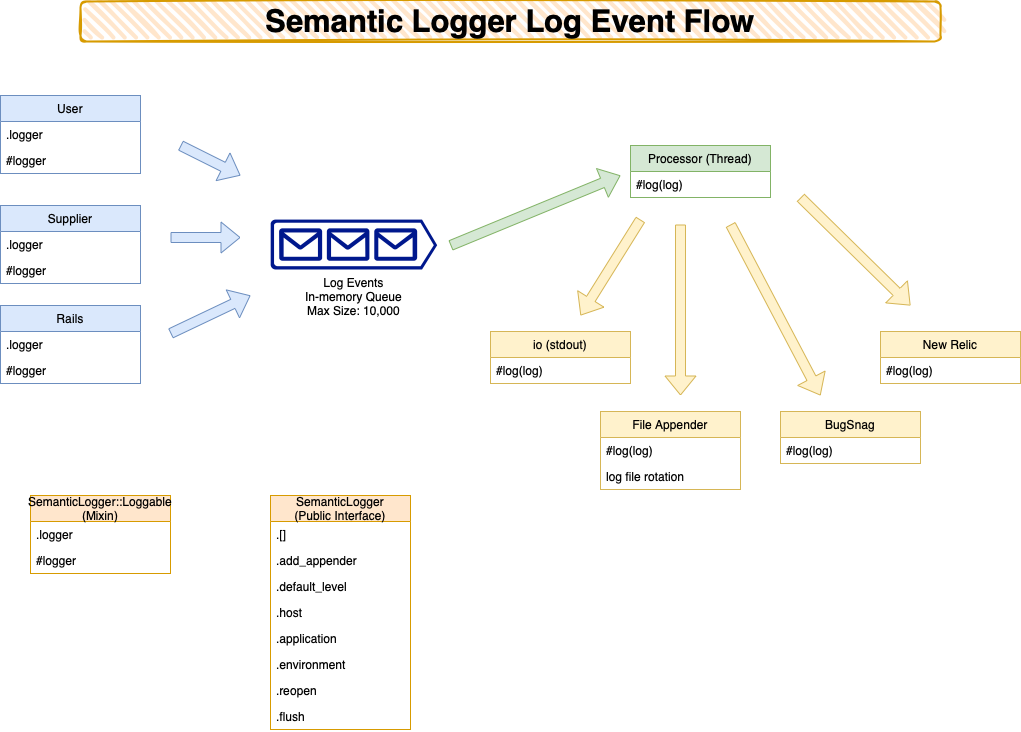
This design is why Semantic Logger is both fast and thread safe: log calls from hundreds of concurrent threads simply enqueue events, and each appender writes them out sequentially in the correct order. For the rare cases where you want logging to happen inline on the calling thread, see Synchronous Operation.
This design is also tunable for production workloads. The in-memory queue is capped by default (blocking when full so that no log message is lost), but it can instead drop messages to protect application availability, give a slow appender its own thread, retry transient appender failures, and be monitored at runtime. See Performance and reliability tuning in the Configuration guide.
Ruby Support
For the complete list of supported Ruby versions, see the Testing file.